



The myth of automated network detection
Many users assume that Binance wallet interfaces automatically detect the correct network for any given asset, leading to the common binance wallet network selection error. In reality, the wallet software is designed to prioritize user-defined parameters to prevent cross-chain asset loss. If you are encountering persistent issues, you may want to consult a Binance wallet troubleshooting guide to ensure your software is configured correctly.
While modern interfaces display warnings when a deposit address format appears incompatible with a selected chain, the system does not perform a deep-layer handshake to confirm that the sender’s protocol matches the receiver’s protocol before the transaction is broadcast.
This technical limitation exists because blockchain networks operate as isolated environments. A wallet cannot query the sender’s private key or transaction history to verify which chain they intended to use.
Consequently, if a user selects the BEP20 network while attempting to send an ERC20 token, the interface may allow the transaction to proceed because the address formats for both networks are often identical in the Ethereum Virtual Machine (EVM) ecosystem. The error only manifests when the transaction fails to settle on the destination chain or results in the asset being trapped in an incompatible contract.
Manual verification requirements
The user remains the final authority for network compatibility because the blockchain protocol itself is immutable once a transaction is signed and broadcast. Automated systems cannot reverse a transfer sent to the wrong network, making manual verification a mandatory step in the security workflow. To avoid errors, users must verify three specific data points before confirming any transfer:
- Token Contract Address: Ensure the token contract matches the specific network (e.g., checking the contract address on BscScan for BEP20 or Etherscan for ERC20).
- Address Prefix: While EVM chains share the ‘0x’ prefix, non-EVM chains like Solana or Cardano use entirely different formats. Always confirm the destination wallet supports the specific network prefix.
- Network Tag/Memo: For assets like XRP or XLM, the network selection is only half the requirement; failing to include the correct Memo or Tag will result in a successful network transfer that never credits the destination account.
Relying on the wallet’s default selection is a frequent point of failure. Always manually toggle the network dropdown to match the exact protocol utilized by the sending platform, regardless of how the wallet interface pre-fills the field.
Anatomy of a binance wallet network selection error
A binance wallet network selection error occurs when the destination address format does not align with the cryptographic requirements of the chosen blockchain protocol. When you initiate a withdrawal, the Binance backend performs a checksum validation against the selected network’s specific address structure.
If the address string fails this validation, the interface blocks the transaction before it reaches the mempool, preventing the irreversible loss of funds.
Address format validation mechanisms
Binance utilizes automated address format validation to ensure cross-chain compatibility. Each blockchain network employs a unique address prefix and length requirement. For instance, an Ethereum (ERC-20) address typically starts with “0x” and consists of 42 hexadecimal characters. Conversely, a Solana (SOL) address uses Base58 encoding and does not share this prefix structure.
The validation mechanism operates through three primary layers:
- Regex Pattern Matching: The system checks if the input string matches the expected character set and length defined by the network protocol.
- Checksum Verification: For networks like Ethereum, the system verifies the EIP-55 mixed-case checksum. If the address contains incorrect casing, the system rejects it to prevent errors caused by typos.
- Network-Specific Prefix Scanning: The platform scans for network-specific identifiers. If you attempt to send assets to a Bitcoin (BTC) address while selecting the BNB Smart Chain (BEP-20) network, the system identifies the mismatch in address formatting standards and triggers the error message.
This technical safeguard is designed to prevent “cross-chain blackholing,” where assets are sent to a valid address on the wrong network. Because different blockchains operate on distinct ledgers, a transaction sent to an incompatible address format is often impossible to recover, as the private keys for that address on the target network may not exist or may be inaccessible to the sender. By enforcing these checks at the point of entry, Binance mitigates the risk of user-initiated errors that would otherwise result in permanent asset loss.
Asset recovery limitations for cross-chain transfers
When a user encounters a Binance wallet network selection error, the primary risk involves sending assets to an address on a blockchain that the receiving platform does not support or cannot reconcile. Contrary to popular belief, funds are rarely “lost” in the void; they are simply trapped in a smart contract or address space that the user cannot access via their standard wallet interface. Recovery is contingent upon the private key owner’s ability to interact with the destination network directly.
Technical barriers to private key access
The core issue stems from how different blockchains handle address derivation. While Ethereum, Binance Smart Chain (BSC), and Polygon often share the same address format (EVM-compatible), other networks like Bitcoin, Solana, or Cardano utilize entirely different cryptographic schemes. If you send ERC-20 tokens to a Bitcoin address, the destination wallet does not recognize the transaction because the underlying protocols are fundamentally incompatible.
Even when addresses appear identical, the technical barrier remains significant. To recover these assets, you must possess the private key or seed phrase for the destination address. If the destination is a custodial exchange wallet—where the exchange holds the keys—you are entirely dependent on their support team’s willingness and technical capability to perform a manual recovery. For those concerned about long-term custody, understanding the Binance vs hardware wallet privacy comparison is essential.
Many exchanges refuse these requests because the process requires:
- Manual node intervention: Exporting the private key from a secure, air-gapped environment to sign a transaction on a non-standard chain.
- Security risks: Exposing the exchange’s hot or cold wallet keys to perform a one-off recovery poses a systemic risk to all other users’ funds.
- Resource allocation: The engineering hours required to trace and move “stuck” assets often exceed the monetary value of the tokens involved.
If you sent assets to a self-custody wallet where you hold the keys, you can theoretically import that seed phrase into a wallet that supports the destination network. For example, if you sent tokens to a BSC address that you own but cannot see in your Ethereum-based wallet, importing your seed phrase into MetaMask and manually adding the BSC network configuration (RPC URL, Chain ID, and Symbol) will typically reveal the missing balance.
However, if the asset was sent to a network that uses a different cryptographic standard, the private key you hold may not be mathematically valid for the destination chain, rendering the assets permanently inaccessible.
Distinguishing network congestion from selection errors
Users often conflate a binance wallet network selection error with general blockchain congestion. While a network selection error stems from a mismatch between the sender’s protocol and the receiver’s supported chain, congestion manifests as delayed confirmation times despite correct configuration.
If your transaction remains in a ‘pending’ state for hours, it is likely a result of low gas fees or high network traffic rather than an incorrect chain selection. To verify the cause, check the status of your transaction on the respective block explorer, such as BscScan for BEP-20 or Etherscan for ERC-20.
If the explorer shows the transaction as ‘Success’ but the funds have not arrived in your destination wallet, you have likely sent assets to a contract address that does not support the specific token standard on that network. If you find yourself frequently managing complex assets, you might benefit from learning how to manage multi-chain assets on binance to avoid these pitfalls.
Transaction hash analysis for path confirmation
The transaction hash (TxID) acts as the definitive audit trail for your transfer. By inputting your hash into the appropriate block explorer, you can isolate the exact network utilized during the transfer. Follow these steps to perform a technical audit:
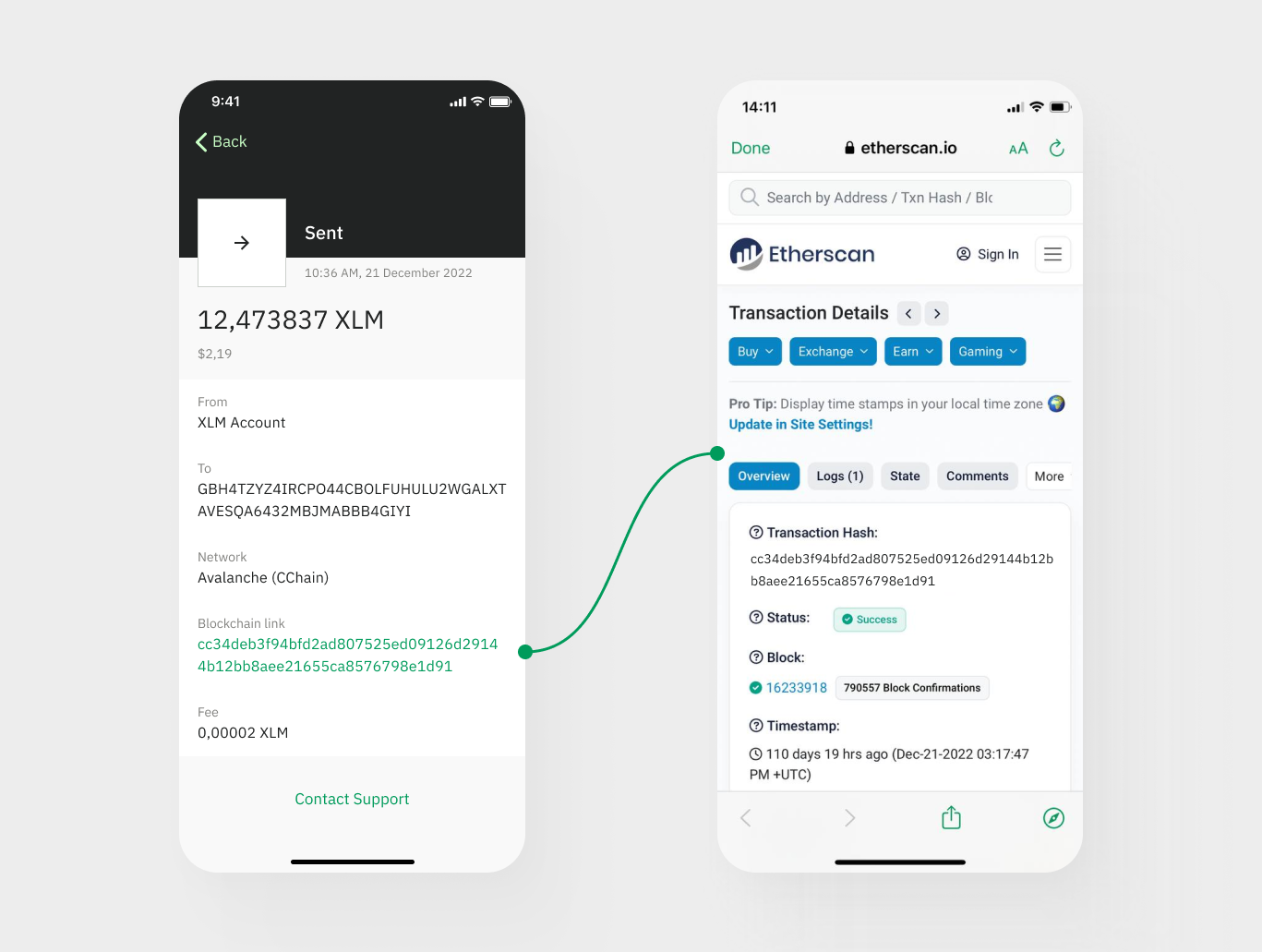
- Locate the TxID: Find the transaction hash in your Binance withdrawal history or wallet activity log.
- Identify the Explorer: If you intended to send via the BNB Smart Chain (BEP-20), ensure you are searching on BscScan. If you used the Ethereum network, use Etherscan.
- Check the ‘To’ Address: Verify if the recipient address on the explorer matches the address you pasted. If the address is correct but the network is wrong, the funds are trapped on the incorrect chain.
- Examine Token Standards: Look at the ‘Token Tracker’ field on the explorer page. If the transaction shows a different token contract than the one you intended to send, you have identified a configuration mismatch.
If the block explorer indicates that the transaction was successfully broadcast to the wrong network, you must import your private keys or seed phrase into a wallet that supports the network where the funds were mistakenly sent. For example, if you sent BEP-20 tokens to an Ethereum address, you can access those funds by connecting your wallet to the BNB Smart Chain using the same recovery phrase, as the address derivation remains consistent across EVM-compatible chains.
Standardized protocols for secure asset transfers
Preventing a Binance wallet network selection error requires adhering to strict verification protocols before initiating any blockchain transaction. The core issue often stems from a mismatch between the token standard supported by the sender and the receiving address format on Binance.
Because Binance supports multiple chains for the same asset—such as USDT on Ethereum (ERC-20), BNB Smart Chain (BEP-20), and Tron (TRC-20)—selecting the incorrect network leads to permanent asset loss if the destination address is incompatible with the chosen protocol. For those who prioritize security, it is also wise to follow a Binance wallet privacy settings guide to add an extra layer of protection to your account.
Pre-transaction checklist
Follow these specific steps to ensure your transfer aligns with Binance’s infrastructure:
- Verify the Token Contract Address: Before sending, cross-reference the token’s contract address on a block explorer like Etherscan or BscScan. Ensure the network you select in your source wallet matches the network displayed on the Binance deposit page.
- Check Address Prefixes: Familiarize yourself with address formats. For instance, Ethereum and BNB Smart Chain addresses both start with “0x,” but sending assets across these chains requires the specific network to be selected in the Binance deposit interface. Tron addresses typically start with “T.” If your source wallet shows a different prefix than the network you selected on Binance, stop the transaction immediately.
- Perform a Small Test Transaction: If you are moving a significant amount of assets, send a minimal amount first. This confirms that the network path is open and that the receiving wallet correctly identifies the asset.
- Confirm Network Fee Compatibility: Ensure your source wallet holds the native gas token for the selected network. For example, you must have ETH for ERC-20 transfers and BNB for BEP-20 transfers. If the wallet lacks the native token for gas, the transaction will fail, preventing the network selection error from ever reaching the blockchain state.
By treating every transaction as a unique cross-chain event rather than a generic transfer, you eliminate the primary cause of asset recovery issues. Always prioritize the network label over the asset name, as the network dictates the underlying ledger where your funds will reside. If you ever need to clean up your connections, remember binance web3 wallet privacy settings for dapps to maintain a secure environment.
Frequently Asked Questions
Recovery procedures for incorrect network selection
Recovery depends on whether the destination wallet supports the specific blockchain and if you have access to the private keys or if Binance support can facilitate a cross-chain recovery for that specific asset and network pair.
Primary causes of network selection errors
This error typically occurs when the deposit or withdrawal address format is incompatible with the selected blockchain protocol, or when the asset is not supported on the chosen network.


