



Root causes of Binance wallet signature request failed errors
A Binance wallet signature request failed error typically indicates a breakdown in the communication bridge between your browser-based wallet extension and the decentralized application (DApp) you are interacting with. This failure prevents the cryptographic signing of a transaction, effectively halting any on-chain action.
While users often perceive this as a wallet-side bug, the issue frequently stems from network congestion, outdated session states, or misconfigured RPC endpoints.
RPC node synchronization delays
The signature broadcast process relies on the wallet communicating with a Remote Procedure Call (RPC) node to verify the current state of the blockchain, such as your account nonce and gas price estimates. If the RPC node is experiencing high latency or is out of sync with the mainnet, the wallet may fail to construct a valid signature packet.
When the wallet sends a request that the node cannot process due to a lag in block height, the transaction validation fails before it even reaches the mempool. To mitigate this, users can manually switch their RPC provider in the Binance Wallet settings. Using a high-performance node provider like Infura or QuickNode often resolves signature failures caused by public node congestion.
If the wallet is stuck on a stale block, the signature request will time out because the nonce provided by the wallet does not match the expected value on the blockchain.
DApp session expiration and cache conflicts
Browser extensions often maintain a persistent connection with a DApp via a session token or a cached site-data object. If the DApp’s backend session expires but the front-end interface remains active, the signature request sent to the wallet will be rejected by the DApp’s security layer.
This mismatch creates a conflict where the wallet is ready to sign, but the DApp refuses to accept the resulting payload because the authorization context is no longer valid. Clearing the browser cache or disconnecting and reconnecting the wallet through the DApp’s UI forces a fresh handshake.
In many cases, the signature failure is simply the result of the DApp’s internal state becoming desynchronized from the wallet’s current account address. Refreshing the page or clearing site data for the specific domain effectively resets the session parameters, allowing the signature request to proceed without further interference.
Security mechanisms triggering signature rejection
When a user encounters a Binance wallet signature request failed error, it is frequently the result of the wallet’s internal security layer actively blocking a potentially harmful transaction. These mechanisms are designed to prevent unauthorized access to assets by validating the integrity of the data being signed against known threat patterns.
Malicious contract detection
The primary defense mechanism within the Binance Web3 Wallet involves real-time automated risk assessment. When a decentralized application (dApp) prompts a user to sign a message or transaction, the wallet interface cross-references the destination contract address against a global database of flagged or blacklisted entities.
If the contract has been reported for phishing, rug-pull activity, or interacting with known malicious drainer scripts, the wallet will automatically trigger a signature rejection. This process relies on several technical checkpoints:
- Contract Bytecode Analysis: The wallet scans the target contract for patterns associated with common exploits, such as unexpected `setApprovalForAll` calls that grant unlimited access to a user’s token balance.
- Domain Verification: The wallet checks the dApp’s URL against a list of verified domains. If the signature request originates from a domain that mimics a legitimate platform but lacks proper SSL or DNS reputation, the request is blocked to prevent credential harvesting.
- Heuristic Anomaly Detection: If a signature request deviates from standard protocol interactions—such as requesting a signature for an unusually high-value asset transfer without a clear, corresponding smart contract function—the system flags the request as high-risk.
These automated safeguards prioritize user safety over transaction speed. While this can lead to false positives where legitimate but obscure smart contracts are blocked, it serves as a critical barrier against automated wallet-draining attacks.
If a user is confident in the legitimacy of the dApp, they should verify the contract address on a block explorer like BscScan to ensure it has a verified source code and a history of legitimate transactions before attempting to bypass security warnings, though caution is strictly advised.
Verification steps for transaction integrity
When a Binance wallet signature request failed error persists, the primary objective is to isolate whether the issue stems from a corrupted local state, network latency, or a mismatch in the transaction payload. Before attempting to re-sign, verify that the transaction data has not been tampered with by checking the raw hex data against the intended smart contract function call.
Tools like Etherscan’s ‘Decode Input Data’ feature allow you to inspect the function signature and parameters to ensure they align with your expectations.
Cross-platform testing procedures
To determine if the error is localized to your specific interface, compare the transaction behavior across different environments. If you are using the Binance Wallet browser extension, attempt to import your seed phrase into a secondary, clean browser profile or a different wallet interface like MetaMask or Rabby.
This isolates whether the failure is triggered by the Binance extension’s internal signing logic or a broader issue with the RPC node connection.
- Browser Extension: Clear your cache and cookies, then disable conflicting extensions like ad-blockers or other multi-chain wallets that might be attempting to intercept the ‘eth_sign’ or ‘personal_sign’ request.
- Mobile App: If the error occurs on the Binance mobile app, ensure your application version is updated to the latest build. Older versions often lack support for EIP-712 typed data signing, which is a common trigger for signature failures in modern dApps.
- Network Switching: Manually toggle your RPC provider. Sometimes, a specific node provider may fail to broadcast the signature request due to synchronization lag. Switching from a default provider to a public endpoint like Flashbots or a private node can resolve intermittent connectivity issues.
If the error persists across both mobile and desktop environments, the issue likely resides within the dApp’s frontend code rather than your local wallet installation. Inspect the browser console (F12) for specific error codes such as ‘User denied transaction signature’ or ‘Invalid JSON-RPC response’.
These logs provide the exact technical reason for the rejection, allowing you to distinguish between a user-side cancellation and a protocol-level communication failure.
Limitations of current dApp-to-wallet communication
The persistence of the Binance wallet signature request failed error often stems from the
inherent friction between decentralized applications (dApps) and browser-based wallet extensions. When a dApp initiates a signature request, it relies on the EIP-712 standard to present human-readable data to the user.
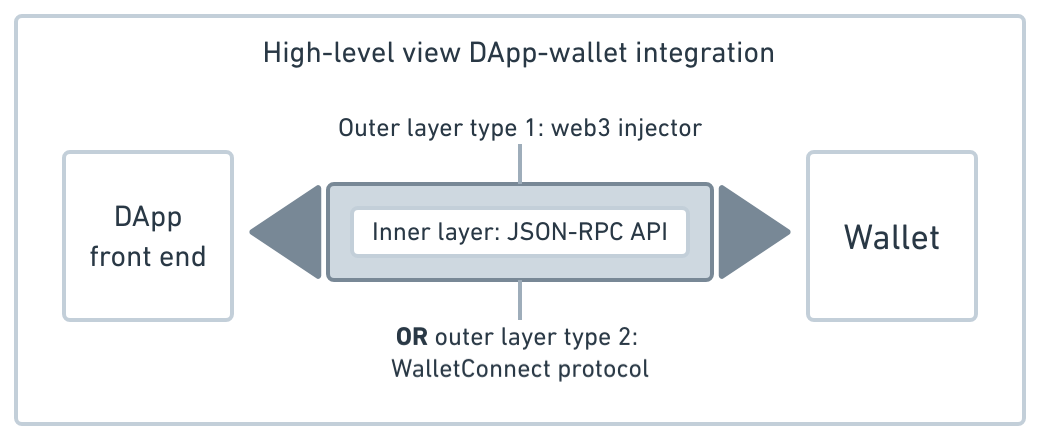
If the dApp provides a malformed payload or if the wallet’s internal state is out of sync with the blockchain’s current nonce, the communication channel breaks down before the user ever sees the prompt.
Synchronization and Nonce Mismatches
A primary technical bottleneck is the management of nonces. Every transaction or signature request requires a unique nonce to prevent replay attacks. If a user attempts to sign multiple transactions in rapid succession, the Binance Wallet may fail to update its local nonce counter accurately.
This leads to a signature request failure because the network rejects the request as invalid or outdated. To mitigate this, users often have to manually reset their account activity in the wallet settings, which clears the pending transaction queue and forces a fresh synchronization with the RPC provider.
RPC Provider Latency and Timeout Issues
The connection between the wallet and the blockchain is facilitated by Remote Procedure Call (RPC) nodes. If the chosen RPC node experiences high latency or intermittent packet loss, the signature request may time out.
Most wallet extensions have a hard-coded timeout threshold—typically between 30 to 60 seconds. If the dApp does not receive a response within this window, it defaults to an error state. Developers can improve this by implementing robust retry logic, but users are often left with a failed request because the wallet is waiting for a confirmation from a node that has already dropped the connection.
Browser Extension Sandboxing
Browser security models impose strict sandboxing on extensions, limiting how they interact with web pages. The window.ethereum provider injection is a shared resource.
If multiple extensions—such as MetaMask, Trust Wallet, and Binance Wallet—are active simultaneously, they may compete for the same provider namespace. This conflict frequently causes the signature request to be intercepted or blocked by the wrong extension, resulting in a silent failure or a generic error message that misleads the user about the root cause of the issue.
Mitigation strategies for recurring signature failures
When users encounter a persistent Binance wallet error, the issue often stems from synchronization delays or browser-level security conflicts. To resolve these, start by clearing your browser cache and cookies specifically for the Binance domain.
Cached session data can become corrupted, leading to mismatched nonce values during the signing process, which prevents the wallet from broadcasting the transaction to the blockchain. If the error persists, verify that your browser extensions are not interfering with the Web3 injection process.
Tools like MetaMask or Phantom can sometimes conflict with the Binance Wallet extension if both are active simultaneously. Disable all other crypto-related extensions and perform a hard refresh of the browser using Ctrl+F5 (or Cmd+Shift+R on macOS). This forces the browser to re-establish a clean connection to the Binance API gateway.
Hardware and software synchronization checks
For users utilizing hardware wallets connected via the Binance interface, a signature failure is frequently a timeout issue. Ensure your Ledger or Trezor device is unlocked and the specific app (e.g., Ethereum or Binance Smart Chain) is open before initiating the transaction on the website.
If the device remains idle for more than 30 seconds, the communication bridge between the browser and the hardware device often closes, causing the signature request to fail. Additionally, check your system clock settings. Blockchain protocols rely on precise timestamps to validate transaction requests.
If your computer clock is out of sync with network time servers by even a few seconds, the signature request may be rejected by the Binance backend for security reasons. Enable ‘Set time automatically’ in your OS settings to ensure your local environment matches the server requirements.
If you are using a VPN, disable it temporarily; some regional security filters flag encrypted traffic from VPN exit nodes as suspicious, causing the wallet to abort the signature process to protect your assets.
Frequently Asked Questions
Primary triggers for Binance wallet signature request failed errors
The error is typically triggered by a mismatch between the dApp’s expected chain ID and the wallet’s current network state, or an expired session token that prevents the wallet from cryptographically signing the transaction request. To avoid these issues, ensure you understand how to manage multi-chain dapps in binance wallet effectively.
Security implications of signature rejection
No. In most cases, this is a technical communication error between the browser extension or mobile interface and the decentralized application. It does not imply that your private keys or assets have been accessed by unauthorized parties. For more advanced users, checking the binance web3 wallet dapp compatibility list can help verify if the platform you are using is fully supported.


