



Core trade-offs in NFT storage
Learning how to manage NFTs in Binance Wallet requires a strategic choice between using the integrated Binance Wallet vs Hardware Wallets like MetaMask or Ledger. The primary trade-off involves balancing the seamless liquidity of the Binance marketplace against the security benefits of holding your own private keys.
Centralized convenience versus self-custody control
When you store NFTs directly in your Binance Web3 Wallet, you benefit from a streamlined interface that allows for near-instant listing on the Binance NFT Marketplace. This setup eliminates the need for complex bridge transactions or manual gas fee calculations when moving assets between chains.
Because the wallet is integrated with Binance’s infrastructure, users can leverage the platform’s security protocols, including multi-party computation (MPC) technology. This removes the single point of failure associated with traditional seed phrases.

However, this convenience comes with specific limitations regarding ownership. While the Binance Web3 Wallet provides a degree of self-custody, it remains tethered to the Binance ecosystem. If you intend to interact with niche decentralized applications (dApps) or participate in specific governance protocols that require a hardware-backed signature, the Binance Web3 Wallet for dapps may lack the necessary compatibility.
In these scenarios, users often find that setting up a hardware wallet provides a superior layer of protection against platform-level risks or account lockouts. Practical management decisions should be based on your trading frequency.
If you are an active trader who frequently flips NFTs, the speed and low-friction environment of the Binance Web3 Wallet are significant advantages. Conversely, if you are a long-term collector holding high-value assets, the trade-off shifts toward prioritizing cold storage. Moving assets to a hardware device adds a layer of physical security that prevents unauthorized digital access, even if your account credentials were compromised.
Technical steps for how to manage NFTs in Binance Wallet
Managing digital collectibles within the Binance ecosystem requires navigating the integrated Web3 wallet interface. Unlike centralized exchange accounts, the Binance Web3 Wallet functions as a self-custodial tool, meaning you hold the private keys and are responsible for the execution of every transaction.
Accessing the NFT collection dashboard
To view your assets, open the Binance app and toggle the interface to the Web3 Wallet tab. Once inside, tap the NFTs icon located on the main dashboard. The wallet automatically scans the blockchain networks you have enabled—such as BNB Smart Chain, Ethereum, or Polygon—to aggregate your holdings.
If an asset does not appear immediately, ensure your wallet is synced to the correct network. You can manually refresh the metadata by pulling down on the screen, which triggers the wallet to re-query the blockchain indexers for your specific public address, or consult a Binance wallet troubleshooting guide for broader issues.
Executing transfers and marketplace listings
Moving or selling an NFT directly from the wallet involves specific on-chain interactions. To transfer an item, select the NFT from your dashboard and tap the Send button. You must input the recipient’s wallet address and confirm the gas fees required to process the transaction on the underlying blockchain. Always verify the address format, as sending an NFT to an incompatible chain or address can result in permanent loss.
For those looking to list assets for sale, Binance Wallet provides a bridge to the Binance NFT Marketplace. By selecting List NFT, the interface prompts you to set a price in the native currency of the chain. The wallet then executes a smart contract approval, granting the marketplace permission to move the asset only when a buyer is found. Issues here can sometimes lead to a signature request failed error.
This process involves two distinct steps: the initial approval transaction and the final listing transaction. You must maintain a small balance of the network’s native token in your wallet to cover these gas costs, as the transaction cannot proceed without sufficient liquidity for network fees.
Security implications of Binance-hosted NFT management
Managing digital collectibles directly within the Binance ecosystem shifts the security burden from the user to the exchange’s infrastructure. When you store NFTs in a Binance-hosted wallet, you are utilizing a custodial service where the platform holds the private keys on your behalf. This architecture eliminates the risk of losing your seed phrase or falling victim to malicious browser extensions that often plague self-custody setups.
Risk profile of custodial wallet services
Relying on exchange security protocols involves a distinct set of trade-offs. Binance employs institutional-grade security measures, including multi-signature cold storage, real-time risk monitoring, and sophisticated encryption protocols. For the average user, these defenses are significantly more robust than a personal hot wallet stored on a standard desktop or mobile device. However, this convenience introduces counterparty risk.
If you choose to manage NFTs in Binance Wallet, you must acknowledge that your assets are subject to the platform’s terms of service and regulatory compliance policies. Unlike a non-custodial wallet where you maintain absolute control, a custodial environment means your access could be restricted if your account is flagged for security reviews or regional compliance adjustments. The primary trade-off is between the ease of recovery and the loss of sovereignty.
Consider these specific security factors when evaluating your storage strategy:
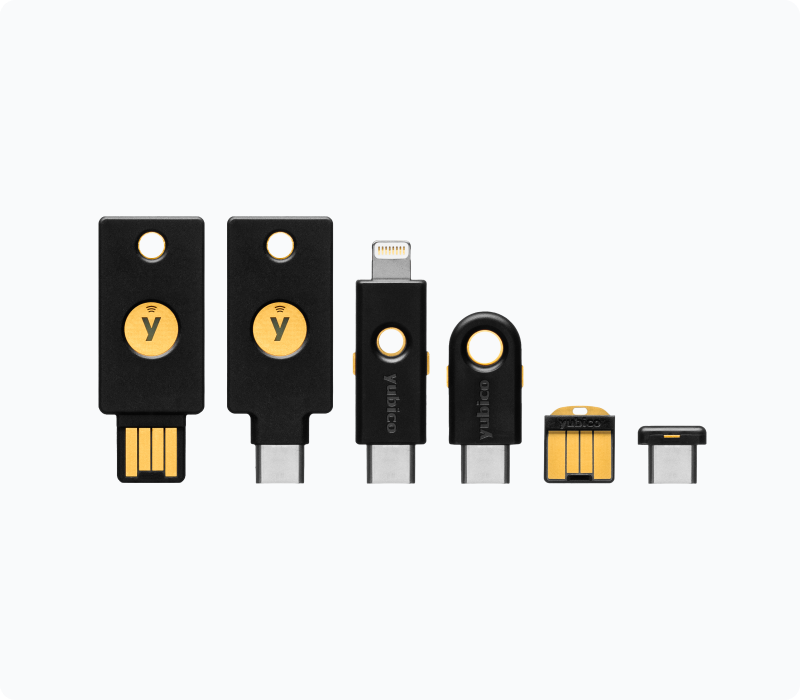
- Account Access: Your NFT security is tied directly to your Binance account credentials. Enabling hardware-based 2FA (such as YubiKey) is mandatory to mitigate the risk of unauthorized access.
- Platform Integrity: Binance’s internal security audits provide a layer of protection against smart contract vulnerabilities that might otherwise drain a self-custody wallet if you interact with malicious dApps. It’s also crucial to manage your dApp privacy settings.
- Recovery Mechanisms: In the event of a lost password, the exchange provides a structured recovery process. This is a significant advantage over self-custody, where a lost private key results in the permanent loss of all assets.
By centralizing your assets, you effectively outsource the technical complexity of blockchain security. While this reduces the likelihood of human error—such as accidental transfers to incorrect addresses or phishing—it requires absolute trust in the exchange’s operational stability and transparency.
Compatibility with external NFT marketplaces
Binance Wallet functions primarily as a custodial-integrated interface, which creates specific operational boundaries when interacting with decentralized NFT marketplaces like OpenSea or Rarible. While you can view assets held within your Binance account, direct interaction with external dApps requires a bridge between your custodial holdings and the Web3 ecosystem.
Connecting to dApps via WalletConnect
To interact with external NFT marketplaces, you must utilize the WalletConnect protocol. This bridge allows you to connect Binance Web3 Wallet to third-party platforms by scanning a QR code or copying a connection string. Once connected, your Binance Wallet acts as the signing authority for transactions initiated on the external site.
However, there are critical limitations to this process:
- Asset Visibility: Not all external marketplaces automatically index every NFT standard (such as ERC-1155 or specific Layer-2 tokens) held in your Binance Wallet. You may need to manually import the contract address of the NFT collection into the interface to see your assets.
- Transaction Signing: Every time you list an NFT for sale or accept a bid on an external platform, you must confirm the transaction within the Binance app. This adds a layer of security but can result in failed transactions if the connection times out or if the gas fees fluctuate rapidly during the confirmation window.
- Network Constraints: Binance Wallet is optimized for the BNB Smart Chain (BSC) and Ethereum. If you attempt to connect to a marketplace operating on a network not fully supported by your wallet interface, such as Solana or specialized L2s, the connection will fail or show an empty inventory.
When managing NFTs, always verify that the marketplace supports the specific token standard of your asset. If you find that an NFT is not appearing on a site like OpenSea despite being in your wallet, check the Etherscan or BscScan block explorer to confirm the token is correctly associated with your wallet address.
When to migrate NFTs to a hardware wallet

While Binance Wallet offers a convenient interface for daily interaction, it functions as a hot wallet environment. For long-term collectors, the primary trade-off involves balancing the ease of listing assets on the Binance Web3 wallet for NFT marketplaces against the enhanced security provided by offline storage. Moving your assets to a hardware device like a Ledger or Trezor removes the private keys from internet-connected systems, effectively mitigating the risk of phishing attacks or exchange-level vulnerabilities.
Criteria for high-value asset protection
Determining when to move assets off the exchange to cold storage depends on your personal risk tolerance and the specific nature of your collection. Consider migrating your NFTs if your portfolio meets any of the following criteria:
- Total Portfolio Value: If the cumulative value of your NFTs exceeds the amount you are comfortable losing in a single security breach, cold storage is the industry standard.
- Long-term Holding Strategy: Assets intended for multi-year holding do not require the liquidity provided by an exchange-integrated wallet. Moving these to a hardware wallet ensures they remain inaccessible to unauthorized parties.
- Asset Rarity and Liquidity: High-value, low-liquidity assets, such as blue-chip profile pictures (PFPs) or rare digital art, are prime targets for hackers. These assets benefit most from the air-gapped security of a hardware device.
When you decide to migrate, ensure your hardware wallet supports the specific blockchain network where your NFT resides, such as Ethereum (ERC-721/ERC-1155) or BNB Chain (BEP-721/BEP-1155). You will need to initiate a withdrawal from your Binance Wallet to your hardware wallet’s public address.
Be aware that this process requires paying network gas fees, which can fluctuate based on network congestion. Once the transaction is confirmed on the blockchain, your NFT will no longer appear in your Binance Wallet interface, and you will need to use a platform like OpenSea or a dedicated portfolio tracker to view or manage the asset securely.
Troubleshooting common management errors
Users often encounter friction when interacting with digital assets due to network congestion or synchronization delays between the Binance Wallet interface and the underlying blockchain. If your NFT does not appear in your dashboard, verify that you are connected to the correct network, such as BNB Smart Chain (BSC) or Ethereum, as assets are chain-specific.
Always ensure your wallet app is updated to the latest version, as outdated software frequently fails to parse newer token standards like ERC-1155 or specific metadata schemas.
Resolving metadata display failures
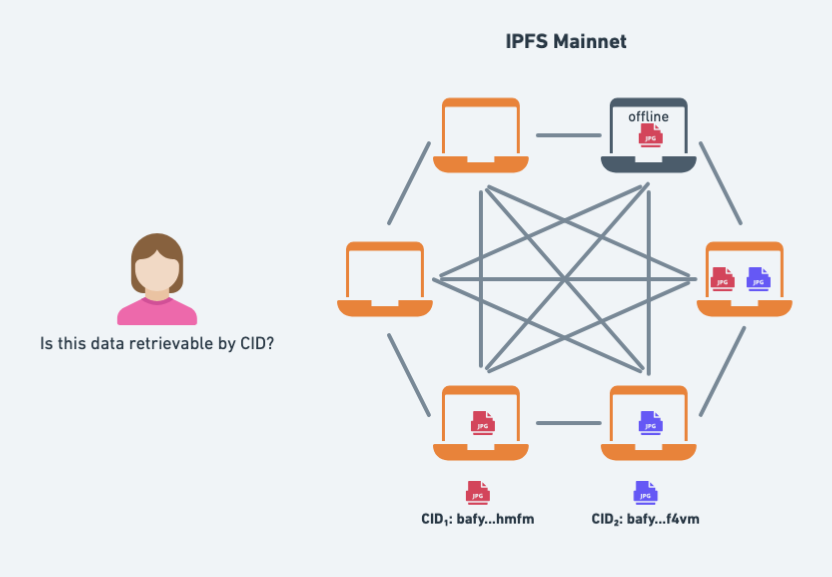
When an NFT image or its associated attributes fail to load, the issue usually stems from the decentralized storage provider (such as IPFS) or a temporary cache error within the wallet. Follow these steps to force a refresh:
- Clear Cache: Navigate to the wallet settings and clear the local cache. This forces the application to re-fetch metadata directly from the blockchain indexer rather than relying on potentially corrupted local data.
- Verify Contract Address: Use a block explorer like BscScan or Etherscan to confirm the NFT contract address. If the token ID exists on the chain but not in your wallet, you may need to manually import the asset using the ‘Add Custom NFT’ function by entering the contract address and token ID.
- Check IPFS Status: If the image remains a placeholder, the metadata link might be broken. You can verify this by pasting the token URI into a browser-based IPFS gateway. If the gateway also fails to load the image, the issue lies with the creator’s hosting, not your wallet.
- Re-import Wallet: As a final measure, re-importing your seed phrase into a fresh instance of the Binance Wallet can resolve deep-seated synchronization errors that persist after clearing the cache.
If these steps do not resolve the display issue, the NFT may be hidden by default due to security filters. Check your ‘Hidden’ folder within the NFT tab, as Binance Wallet often automatically filters assets flagged by community reports or those originating from unverified smart contracts to protect users from malicious airdrops.
Frequently Asked Questions
Suitability of Binance Wallet for long-term NFT storage
Binance Wallet offers high convenience for active traders, but for long-term storage of high-value NFTs, hardware wallets provide superior security by keeping your private keys offline.
Visibility of NFT collections within Binance Wallet
Yes, the Binance Web3 Wallet interface allows you to view and manage NFTs supported on integrated networks like Ethereum and BNB Chain directly within the app.


